


Instagram's Map: How to share location, explore posts, and adjust settings
Instagram recently added Map to let users share their location with friends or explore posts and Reels based on tagged places, with full control over settings
 "Instagram's Map feature")
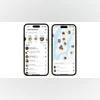
Instagram's Map feature (Image: Instagram)
Listen to This Article
Instagram’s new Map feature has rolled out a few days ago, quickly drawing attention for its location-sharing capabilities. According to The Verge, Meta says the feature is opt-in only, allowing people to share their active location with select friends or explore posts and Reels based on tagged locations. The company notes that users have full control over whether to enable location sharing. Although it has sparked a wave of concern among many users regarding privacy concerns.
However, as of now, the core Map functionality is only available in select regions, and India is not part of it. Nevertheless, here is the full detail on how it works:
Sharing your location with others
According to the Instagram support page, when you open Instagram’s map for the first time, location sharing is turned off by default. If you decide to enable it, your location will appear on the map at the top of your inbox, as well as in other features like Notes. To use this option, your device’s location services must be switched on.
You can adjust your map location settings at any time, including toggling location sharing on or off and selecting who can see your location. Location sharing is limited to accounts that follow you back, ensuring it’s only visible to mutual connections.
Also Read

 "books, book review")
 "Tech Wrap August 7")
 "Instagram's three new features")
 "Tech Wrap August 4")
 "instagram")
If enabled, your location updates whenever you open Instagram and disappear after 24 hours unless you reopen the app. On the map, the following icon means:
- Blue arrow: Location sharing is on.
- Red dot: Location sharing is off.
- Orange triangle: Location permissions need to be enabled.
How to turn off your Instagram Map location
If you simply want to turn off Instagram Maps location sharing, here’s how Instagram says you can disable the feature in the app on both Android and iOS:
- Tap Messages in the top right of Feed.
- Tap Map at the top of your inbox.
- Tap Settings in the top right and select “no one”
- Tap Update at the bottom to save your changes.
How to send a location request
If someone isn’t sharing their location with you, you can send them a request, with the following steps
- Tap the map icon at the top of your inbox.
- Tap the menu in the bottom right.
- Tap Request next to their name.
You can cancel a pending request anytime. If someone shares their location with you but you have not shared yours, tap Share back to do so. You will get a notification when someone requests to see your location, and you can view all requests by tapping Requests at the top of the list. Instagram mentioned that declining a request will not notify the other person.
More From This Section
 "BGMI")
 "Gemini Live")
 "Apple Intelligence wit OpenAI's GPT-5 model")
 "GPT-4o")
 "Garena Free Fire Max")
Don't miss the most important news and views of the day. Get them on our Telegram channel
First Published: Aug 11 2025 | 12:19 PM IST