


Chrome on iOS now allows easy switching between work, personal accounts
Google Chrome adds seamless account switching on iOS, letting users move between personal and corporate accounts without logging out. Also introduces URL filtering for enterprise security
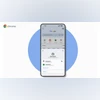 "Chrome on iOS' new feature (Image: Google)")
Chrome on iOS (Image: Google)
Listen to This Article
Google has introduced a new feature in Chrome for iOS that allows users to switch between personal and corporate Google accounts without logging in and out. According to a blog post by Google, the move is aimed at simplifying workflows for users managing both personal and work-related tasks on their iPhones. The update also enhances security by keeping managed (corporate) account data separate from personal usage.
With this update, users can access company resources securely through their work accounts, even on personal devices, without going through the process of logging out from one account and logging in to another.
How to switch between personal and corporate accounts on Chrome for iOS:
- Open the Chrome browser on your iPhone.
- Tap the profile picture in the top-right corner.
- A pop-up will display all the Google accounts signed in on the device.
- Select the desired account to switch.
Earlier, switching between a personal and a work Google account on Chrome required signing out of one before logging into the other. Now, users can toggle between them instantly.
Also Read

 "search engine, browsers")
 "Comet, AI browser, web browser")
 "Google Chrome")
 "ASUS Chromebook CX14")
 "Microsoft")
Google has not yet announced a similar feature for Android devices.
URL filtering for iOS
In addition to account switching, Chrome on iOS is also getting URL filtering support, a feature already available on desktop and Android. This tool lets enterprises block or redirect access to certain websites, such as unauthorised AI tools, while guiding users to approved or safer alternatives.
Pixel 10 Pro teased ahead of launch
Separately, Google has confirmed that its Pixel 10 series will launch in India on August 21, a day after the global “Made by Google” event. The company has also shared the first official image of the Pixel 10 Pro in a new “Moonstone” colour through an email to Google Store subscribers.
More From This Section
 "Apple Intelligence")
 "Moto 360 2nd Generation smartwatch")
 "BGMI")
 "Samsung Galaxy Watch 8 and Watch 8 Classic")
 "Samsung galaxy Buds 3 Pro")
Topics : Google Google Chrome Apple iOS
Don't miss the most important news and views of the day. Get them on our Telegram channel
First Published: Jul 22 2025 | 1:37 PM IST