


Google Search now lets users have voice chat with AI Mode: How it works
Presently, Google's Search Live feature in AI Mode is only available to those users in the US region who have enrolled in the AI Mode experiment in Labs
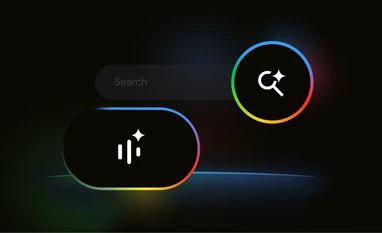 "Google Search Live in AI Mode (Image: Google)")
Google Search Live in AI Mode (Image: Google)
Listen to This Article
Google has announced that it is bringing Search Live in AI Mode to the Google app for Android and iOS. Previewed at Google I/O conference last month, the feature will allow users to have a free-flowing, back-and-forth voice conversation with Search and explore links from across the web. Notably, at the moment, it is only available in the US for users enrolled in the AI Mode experiment in Labs.
Google's new Search Live in AI Mode operates using a customised version of its Gemini model, specifically enhanced for advanced voice interactions. This tailored model integrates Google Search's high-quality information infrastructure to ensure users receive accurate and useful responses, regardless of how or where queries are made. Additionally, the voice-enabled feature leverages a "query fan-out" technique, which expands the range of web content shown, offering users broader and more varied information to explore.
What purpose does it serve?
According to Google, the new Search Live feature is designed to be especially useful when users are multitasking or on the move—for instance, while packing for a trip. By tapping the “Live” icon in the Google app, users can ask questions aloud, such as, “What are some tips for preventing a linen dress from wrinkling in a suitcase?” The AI then provides a spoken response generated in real-time.
Also Read

 "Google Gemini AI model, Google's new AI model, Google's new multimodal AI model, New Google AI, Gemini AI, Gemini Ultra AI, Gemini Pro AI, Gemini Nano AI, Gemini AI support, Gemini AI on Bard, Gemini AI on Pixel 8 Pro, Gemini AI on Google Chrome, Gem")
 "Wilson White V-P, Government Affairs & Public Policy, APAC, Google")
 "Google app")
 "S Chand and Company")
 "Google")
Follow-up questions, like “What should I do if it still wrinkles?” can be asked just as easily. As per the Google blog, relevant web links are also displayed on-screen, allowing users to explore further details without interrupting their flow.
How does it work?
As detailed by Google, once the feature becomes available, users can activate Search Live by tapping the new sparkle-badged waveform icon located beneath the Search bar—the same icon used for Gemini Live.
Alternatively, it can be accessed via a newly added button next to the search text field. Tapping it opens a full-screen interface, which appears in either light or dark mode and features a gradient ‘G’ in the top-left corner alongside an arc-shaped waveform in AI Mode colours. At the bottom, users will find a pill-shaped Mute/Unmute button and a “Transcript” option to switch to text-based interaction. When a query is made, Search Live displays a scrollable list of relevant web links as part of its response.
The feature is designed to continue functioning even if the screen is locked or another app is opened, enabling ongoing voice-based interaction in the background. An 'X' button in the corner allows users to exit the session, while the overflow menu offers access to Search history and Voice settings, which include four modes: Cassini, Cosmo, Neso, and Terra.
More From This Section
 "A Microsoft store in New York")
 "Nothing Phone 3 to be powered by Qualcomm Snapdragon 8s Gen 4 chip (Image: Nothing)")
 "Garena Free Fire Max")
 "Tech Wrap June 18")
 "Microsoft AMD partnership")
Topics : Google Artificial intelligence Google Search
Don't miss the most important news and views of the day. Get them on our Telegram channel
First Published: Jun 19 2025 | 11:05 AM IST