


Microsoft enhances Paint, Notepad and more with AI integration: What's new
On Copilot Plus PCs, the Paint app is getting a new AI feature that lets users create custom stickers by typing text prompts
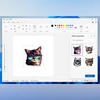 "AI-powered Sticker generator in Paint")
AI-powered Sticker generator in Paint
Listen to This Article
Microsoft has announced AI features to its most familiar Windows apps. In the latest update for Windows Insiders, Paint, Snipping Tool, and Notepad are getting smarter new tools which the company said are designed to boost creativity and productivity for users. These updates are now rolling out to users in the Canary and Dev Channels on Windows 11.
Paint gets smarter with AI stickers and more
This update brings three changes to the Paint app on Windows 11:
- Sticker generator: This new AI-powered tool will allow users to generate custom stickers simply by typing a prompt. For example: “a cat wearing sunglasses.” Once generated, these stickers can be added directly to the canvas, copied to other apps, or saved for later use. Stickers can also be revisited through a new toolbar section.
- Object select: Leveraging AI, this smart selection tool enables users to isolate and edit specific elements within an image. With a simple click, users can pinpoint areas on the canvas and make precise adjustments without manual tracing.
- New welcome experience: For both new and returning users, Paint now opens with a brief tutorial-style welcome dialog. Users can revisit it at any time by clicking the megaphone icon in the toolbar.
It is to be noted that both Sticker Generator and Object Select are available exclusively on Copilot+ PCs and require a Microsoft account.
Snipping tool adds AI-powered screenshots and color picker
The Snipping Tool now includes two new features for enhanced screen capturing:
Also Read

 "Steam Deck")
 "Tech Wrap May 22")

 "Windows 11 dev build")
 "Tech Wrap: May 20")
- Perfect Screenshot: Aimed at precision, this AI-assisted feature automatically resizes the user's screenshot region to fit the content intelligently. It removes the need for cropping or resizing post-capture, ensuring clean and accurate screenshots. It can be quickly activated through the toolbar or by holding Ctrl during selection. It should also be noted that this feature is limited to Copilot+ PCs.
- Colour Picker: Ideal for designers and developers, this feature allows users to select and identify colour on the screen in HEX, RGB, or HSL formats. The tool also supports zoom functionality using scroll or Ctrl + / - shortcuts for pixel-level accuracy.
Notepad introduces AI-powered writing assistant
Microsoft is adding generative AI to Notepad, enabling users to generate content directly within the app using a feature called Write. This tool helps users draft text, complete thoughts, or expand on existing content.
To use it, place the cursor, right-click, and select Write, or access it through the Copilot menu or the Ctrl + Q shortcut. The feature lets users decide whether they want to keep or discard the generated text, or refine results through follow-up prompts.
Write requires a Microsoft account and is available for Microsoft 365 Personal, Family, Enterprise, and Copilot Pro subscribers.
More From This Section
 "XRING O1 System-on-Chip")
 "Garena Free Fire Max")
 "BGMI")
 "Ray-Ban Meta glasses")
 "WhatsApp Voice Chat for groups")
Topics : Microsoft Windows 11 Microsoft Copilot
Don't miss the most important news and views of the day. Get them on our Telegram channel
First Published: May 23 2025 | 11:48 AM IST